LLMs are stateless by default. Each call starts cold, with no recollection of prior turns or accumulated context. For AI agents that span multi-step workflows where each new step depends on the previous one, that constraint becomes a production hurdle.
This guide covers the concept of AI agent memory, types of agentic memory, storage mechanisms, and implementation strategies in n8n.
Why context windows alone don’t solve the agent memory problem
Expanding context windows from a few thousand tokens to a million has created the impression that AI agent memory is a solved problem. It isn’t. Production agents that rely on context alone still hit many of the same failure modes that earlier, smaller-window models did, just at higher token costs and with more elaborate-looking demos.
Context degradation before capacity
Long-context LLMs support retrieval across hundreds of thousands of tokens, but recall accuracy degrades well before the stated limit. Information placed in the middle of a long context tends to get lost, often causing AI hallucinations. A relevant fact at position 50,000 in a 200,000-token window is retrieved less reliably than the same fact sitting in the first or last few thousand tokens. Treating context length as a memory substitute means assuming retrieval quality that doesn’t, in fact, exist.
No salience or prioritization
Context windows don’t know what matters. Every token gets weight based on the model’s attention mechanism, regardless of whether it’s a user preference, a one-off comment, or a critical instruction. Without external memory that explicitly ranks relevance or uses specific extraction rules, important facts compete with conversational filler for the LLM’s attention — and often lose. Token cost scaling makes the brute-force alternative economically painful: passing the full interaction history on every call burns through the budget fast.
No memory between sessions
Stateless sessions mean an agent that helped a user yesterday has no record of that interaction today, even when both runs happened on the same account. Without persistent memory that survives across sessions, every conversation begins from scratch. Any agent memory management strategy that lives entirely in-context evaporates the moment the session closes, and treating the context window as a substitute for memory ends in silent data loss.
💡
Consumer products such as ChatGPT and Claude have already built basic memory management to extract facts that persist between sessions. When you build your own agent, you get the freedom to create this memory system yourself: what kind of data to store, where to keep it, and what to show the LLM in the context window.
AI agent memory types
Practitioners think about agent memory types using the CoALA framework (Cognitive Architectures for Language Agents), drawn from cognitive science and widely referenced across the agentic AI space. The framework separates memory by what it represents, not by where it’s physically stored.This means you choose the memory type based on your business logic first, then decide how to implement it and see what tools are available to you.
Working memory (in-context)
This holds what the agent is processing right now: the current prompt, recent turns, and the immediate task state. It maps to how you hold key points of a conversation while deciding what to say next. The contents vanish when the session ends. In LLM terms, working memory lives inside the context window alongside system instructions, tool descriptions, and the current user message. This type of memory is useful only for the current task.
Semantic memory (factual knowledge)
This type of AI memory stores general knowledge the agent should know regardless of when or where it was collected, like company policies, product documentation, FAQ content, and domain knowledge. Unlike working memory, semantic memories persist across sessions and aren’t tied to a specific interaction. They’re typically encoded as embeddings in vector databases, which support similarity-based retrieval at scale. This is the same retrieval primitive RAG uses to fetch document chunks, applied here to the agent’s persistent knowledge base. Semantic memory for AI agents often stores the largest volume of agent knowledge in production. The volume of facts an agent accumulates over months of operation outgrows any context window long before it outgrows a properly indexed vector store.
Episodic memory (interaction history)
This records what happened during specific past interactions, including when each exchange occurred, what was said, and what the agent did. It lets the agent base responses on shared history and reminds the user of the past interaction outcomes. Episodic memories accumulate over time and require temporal indexing which matters just as much as the semantic context of what happened. Without that temporal layer, retrieval pulls back facts the agent knew once but can’t place in time, possibly producing confidently wrong answers. Episodic memory grows continuously and can become the highest-volume tier in a mature agent over time, especially for high-volume customer-facing agents.
Procedural memory (encoded behaviors)
This kind of memory captures how the agent does things, like tool-calling sequences, response patterns, and escalation rules. It’s the closest analog to human muscle memory — encoded behaviors that don’t need to be redefined each session. Most frameworks bake procedural memory into the system prompt. More sophisticated setups extract patterns from accumulated episodic data and update procedural memory over time, so the agent gets better at routine tasks the more it runs them.
How AI agent memory is stored and retrieved
Storage decisions determine which memories are accessible at runtime. Retrieval decisions determine which subset gets surfaced to the LLM on any given call. Both matter, and getting one right doesn’t guarantee the other.
In-context buffers and summarization
The simplest pattern keeps recent conversation history in a sliding window buffer that gets passed to the LLM each call. When the buffer fills, older entries can either get summarized or selectively dropped. The former preserves the key points without consuming full token budgets. The latter removes less relevant entries while keeping the ones that matter, preventing total context loss.
Summarization compresses the interaction history at the cost of detail and needs an extra LLM call to generate the summary. It works well for chat agents and breaks for coding agents or workflows where prior outputs need to be referenced verbatim.
Vector stores for semantic retrieval
For semantic memories that scale beyond context limits, vector stores are the default. Memories get encoded as embeddings and written to a vector database. Vector search then retrieves matches using similarity to the current query and a re-ranking procedure.
The retrieval pipeline is just as relevant as the store itself. A vector search returning fifty marginally-relevant memories is worse than one returning five highly relevant ones. Tuning the embedding model, the similarity threshold, and the top-k cutoff is what separates a vector store that improves agent output quality from one that just adds latency.
Knowledge graphs for relationship-aware memory
Vector retrieval struggles with relational queries. “Which customer is associated with which support ticket” isn’t a similarity question. Knowledge graphs store memories as nodes and edges, which makes relationships first class. They’re heavier to maintain than vector databases as they require extracting entities and relationships from text and storing them in a graph database like Neo4j. But knowledge graphs allow for more accurate retrieval for agents that need to make connections between entities rather than fetch similar facts.
💡
In practice, most production agents combine at least two storage types. For example, a customer support agent with a buffer for the current conversation, a database for session history, or a vector store for searching relevant data across thousands of past tickets. Each memory storage type takes care of a different memory need and the context window receives a mix from all three sources.
Implementing AI agent memory in n8n
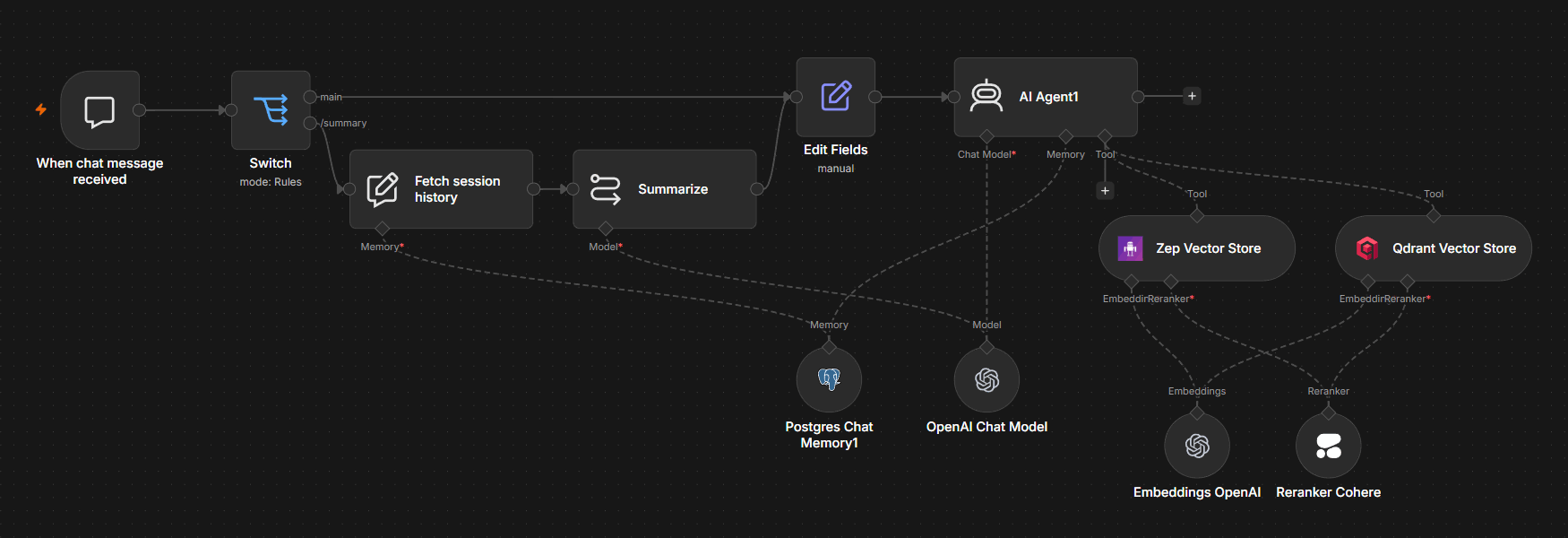
n8n is a workflow automation platform with built-in AI agent capabilities. It treats memory as a configurable part of the workflow where every memory node and its settings can be seen on the canvas with the rest of your agent logic. The AI Agent node connects to memory sub-nodes that define how conversation history is stored, how long it persists, and when memories get retrieved or cleared.
The native memory layer sits on the canvas alongside every other node — inspectable and modifiable without writing custom infrastructure code. For storage methods without dedicated nodes, like knowledge graphs or custom summarization, you can build the logic using the Code and HTTP Request nodes.
Production failures with memory for AI agents tend to come from the implementation layer, not the conceptual one. Teams understand they need persistent memory, but they don’t always have a way to integrate it into their existing automation stack.
n8n’s memory sub-nodes are meant for keeping and retrieving the conversation history. The Chat Memory Manager adds advanced functionalities for handling memory such as checking memory size or clearing specific entries. Combined with external vector store connections, the platform exposes n8n AI agent memory as workflow primitives engineers can wire together.
💡
Each AI Agent node accepts one memory sub-node. To combine memory types, use the memory sub-node for conversation history and connect vector stores as agent tools.
Short-term memory with sub-nodes
The Simple Memory node, configured with a session ID, gives each conversation its own short-term store. Memories accumulate within a session and stay isolated from other users or workflow runs. This handles the working memory pattern out of the box — an agent that remembers what the user said three turns ago, without leaking that context into another user’s session.
💡
For single-instance deployments this works out of the box. In queue mode, use Postgres or Redis Chat Memory for reliable session isolation across workers.
Advanced memory control with Chat Memory Manager
For workflows that need explicit control over what the LLM remembers, the Chat memory manager node lets engineers insert, retrieve, or clear specific memories programmatically. It’s where memory pruning and injection logic live, allowing you to check memory size, remove older entries, or insert context the agent needs. Pair it with optional JavaScript or Python code nodes when memory management rules don’t fit the standard patterns — a useful workaround for agents that need custom retention behavior without sacrificing the visual model.
Long-term memory with persistent storage
For long-term memories that need to persist and scale, n8n connects to external vector store nodes — Pinecone, Weaviate, Qdrant — alongside Postgres Chat Memory and Redis Chat Memory nodes.
Postgres Chat Memory and Redis Chat Memory store conversation history chronologically. For semantic and episodic memories that need similarity-based retrieval, vector store nodes embed and index memories for on-demand search.
Swap Pinecone for MongoDB Atlas and the workflow shape stays the same. Only the storage backend changes, which lets teams evolve the long term memory layer without rewriting the agent.
For entity memory, the Zep Memory node automatically extracts facts about users, sessions, and entities from conversations without manual configuration. It combines entity extraction, summarization, and data retrieval in one sub-node.
Weaving memory naturally into infrastructure with n8n
Teams shipping agentic workflows in production treat memory as a first-class workflow primitive rather than afterthought added after the agent ships. n8n’s approach makes each layer a configurable workflow component, inspectable and modifiable like any other node. Memory sub-nodes, the Chat Memory Manager, and external vector store integrations cover most of the CoALA memory types without custom infrastructure. Engineering teams can achieve smooth, reliable workflows with in-built memory capabilities.
Explore pre-built AI workflow templates to see these patterns running end-to-end. Sign up for n8n’s Cloud trial, and start building agents that remember what matters.